Frequently Asked Questions
Yes! It has no malware or spyware in it. Independent proof is at VirusTotal ↗ for your confirmation.
However, some low-quality anti-virus apps might give a false-positive warning ↗ because you can use it to control your PC. Therefore, you should whitelist AlomWare Toolbox's folder (not "Toolbox.exe" alone) as an exclusion with your anti-virus app (see how for Windows 10) to prevent the warning.
The app also doesn't send any data from your PC over the internet to us or anyone else. It's offline and portable with no cloud account needed. You can block it with a firewall ↗ if you want extra reassurance.
Still not convinced? Please refer to our history ↗ to see how long we've been in business, because dodgy companies don't last very long. See also our satisfied customer reviews on Trustpilot.com ↗ and Google's "Safe Browsing" status ↗. Everything we do at AlomWare is always ethical and above-board.

AlomWare Toolbox runs on English versions of Windows 7 or later (64-bit only), with or without admin rights. Running it with admin rights gives it far better functionality and control of your PC. There is no setup or installation needed due to it being portable: just unzip the download ↗ somewhere permanent (even to a USB stick) and run the "Toolbox.exe" file for immediate use.
English is the only official supported language, as the app uses a massive amount of in-app text and we do not have the money or resources to translate the app into different languages. Additionally, much of the text is built on-the-fly during runtime, so direct translations are not always possible anyway. From v6.0.0.0 though, we have introduced limited translation abilities for basic text in the app's windows.
Due to the app being a standard Win32 executable, it can't support dark mode natively like Windows Store apps; but it does have a setting to dim its windows to reduce glare as a compromise (see here ↗). You can also change the color scheme to whatever you wish, or even have no color scheme at all (so that all its windows and prompts will use your current PC scheme).
For sight-challenged users, accessibility is something we're acutely aware of, and we're working on ways to give better functionality for these users whenever we can. We thank you for your patience.
AlomWare Toolbox has a free mode when you paste a short unlock code from our Payment page. We can't offer a totally free version unless we show ads in the app and/or collect personal data about you, meaning you'd become the product instead. That's not respecting you, so we're not going that route.
However, since being free doesn't pay the bills and we don't have any sponsors, we have two payment options for you to support us. Your payment might even be tax-deductible for your use situation, and we recommend you seek your own independent financial advice to find out. Please consider a payment.

Wanting software to be open-source is like going to a restaurant and wanting to go into the kitchen to watch your meal being cooked, so you know exactly how it's prepared. But you don't do this, because you trust the restaurant's reputation and can see others eating there without any safety/health issues.
Software should be no different. Our reputation precedes us ↗ and we wouldn't be around if malware or dodgy practices arose from using the app. However, we're not totally closed-source. If you're on the Gold Coast of Australia, you can book a one-hour paid "source inspection" at our office to examine the code yourself and build your own "Toolbox.exe" to take away with you. You can't copy the source or take images of it, but you'll be satisfied that the app is safe. Contact us if interested. Conditions apply.
AlomWare Toolbox's automation functions are intended for local PC activity that simulates a person doing physical actions, such as keyboard typing and mouse actions; and to work with files and folders and manipulate windows.
It is not a comprehensive automation system that allows you to delve into online databases and extract specific data for download or modification, and nor can it be used control hardware devices or access other systems remotely (unless keystrokes and the mouse can simulate it). For these situations you will need to seek an alternative product.
Here are screenshots of the automation steps that AlomWare Toolbox provides for its actions:
Computer - Delays - Files - Folders - Keyboard - Macros - Mouse - States - Text - Windows


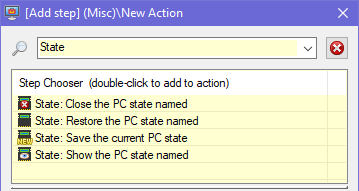
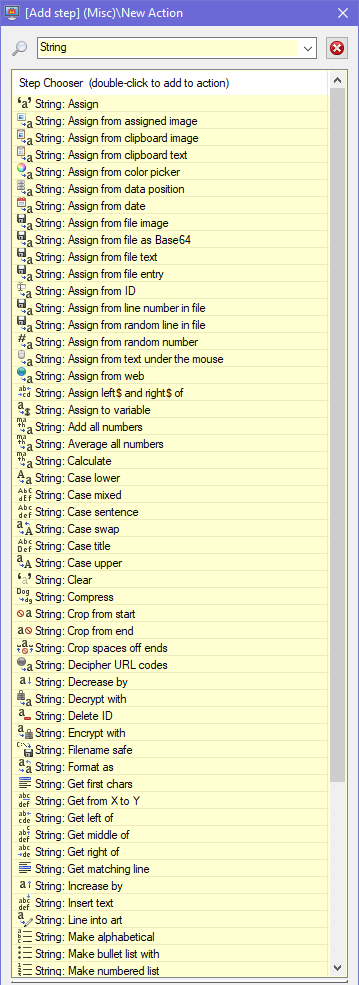

We have an Online Manual ↗ for you to browse, but please note that the "Automation" topic isn't fully done at this time. Each automation step has a detailed help box, so please read it to better understand how the step shown works. Please read the entire online manual; in particular the "Support" topic for basic troubleshooting when using the app for the first time.
AlomWare Toolbox is a very powerful and feature-rich product, and if you only spend a few minutes with it then you're really going to miss out on all it can offer. It actually does far more than you might assume, so please take some actual time to read what all the automation steps can do. You'll be surprised!
Don't forget you can also register and post questions on our Forum ↗, which is our preferred method of contact because our answers can support other users who may be browsing for the same issue.
